VPS

This post is written from production VPS deployments across enterprise sites worldwide.
Scan-agnostic isn't scanner-indifferent. The pipeline ingests an iPhone scan, a 360 video, a LiDAR point cloud, or a Gaussian splat - which is exactly why the device you pick still matters, and why indoors vs. outdoors changes the answer. This guide matches capture hardware to your space, your light, your precision target, and your map's lifespan.
The first question almost every team asks us is the wrong one.
"Which scanner should we buy?"
I understand the instinct. Hardware is the line item you can see, the thing procurement wants a quote for, the decision that feels safest to nail down first. But it's the wrong place to start, and starting there is how projects end up over budget with a scanner that's perfect for the wrong half of the building.
Here's the better question: what does the space demand, is it indoors or out, and how long does the map have to stay true? Answer those and the hardware mostly chooses itself.
This post is the guide I wish I could hand every team before they spec a capture device. It's written for the people who actually have to produce a visual positioning system (VPS) map and live with it: XR and robotics developers, AEC and operations leads, and the reality-capture teams who now feed all of them. Practical first, technical second.
MultiSet is scan-agnostic. We ingest iPhone LiDAR, 360 video, E57 point clouds, raw LiDAR, and Gaussian splats, and we close the gap between them at map-build time so a phone query matches a survey-grade map the same way it matches an iPhone one.
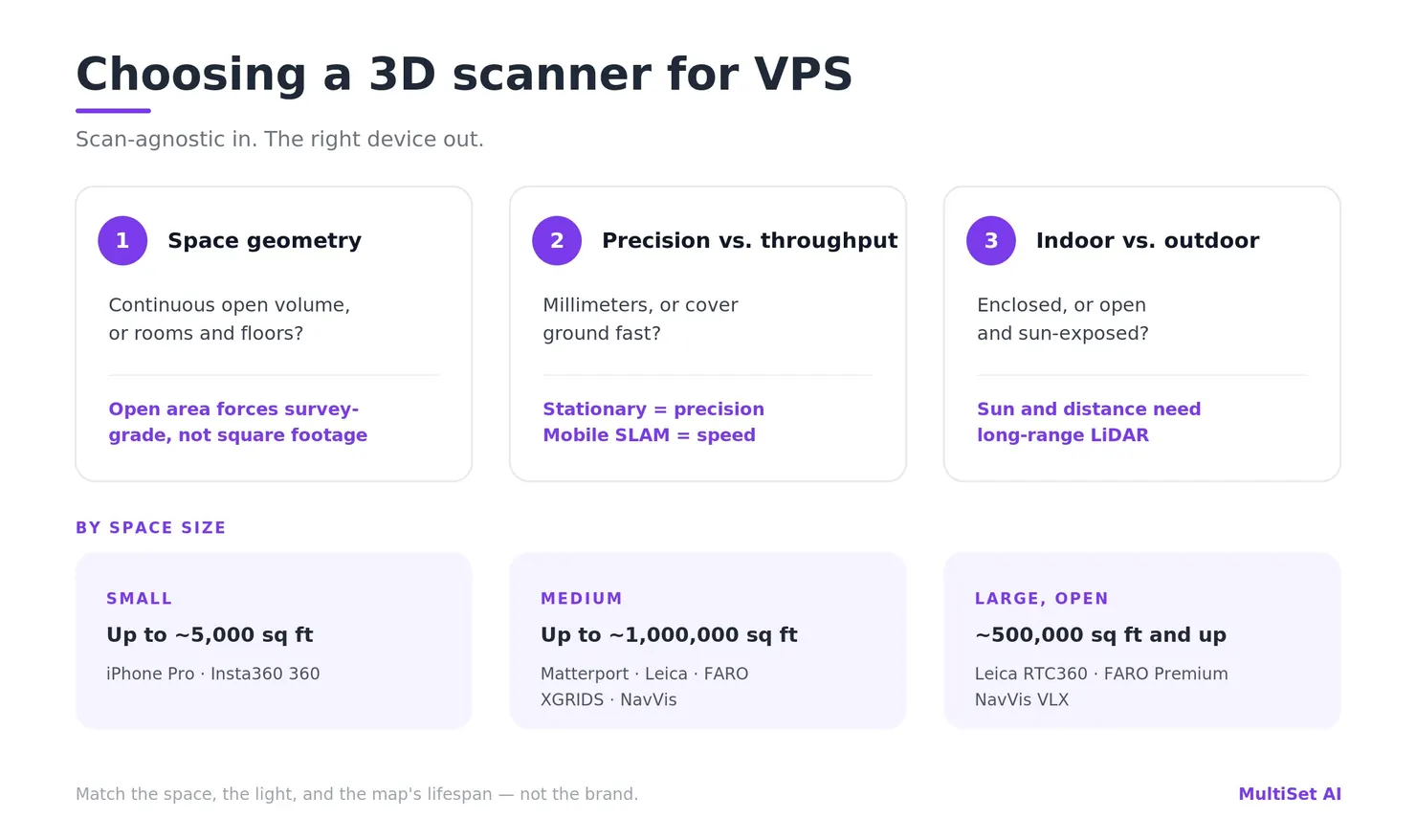
Scan-agnostic does not mean scanner-indifferent. The pipeline will take whatever you give it. It cannot invent coverage you didn't capture or precision your device never had. The device still matters - just not for the reason most buyers think.
Three things decide the right device, and none of them is the brand:
| Decision axis | The real question | What it changes |
|---|---|---|
| Space geometry | Is this one continuous open volume, or rooms, corridors, and floors? | Continuous open area is what forces survey-grade hardware - not raw square footage |
| Precision vs. throughput | Do you need millimeter geometry, or do you need to cover ground fast? | Stationary scanners win precision; mobile SLAM wins speed. We ingest both |
| Indoor vs. outdoor | Enclosed with defined ceilings, or open and sun-exposed? | Decides which devices even work - short-range and IR-based gear is an indoor tool; sunlight and distance demand long-range LiDAR |
And the starting recommendation by space size:
| Space size | Representative devices | Why |
|---|---|---|
| Small - up to ~5,000 sq ft (~500 m²) | MultiSet app (iPhone Pro LiDAR), or a 360 camera (Insta360 X4/X5) | Cheapest path to a clean map; minutes to capture |
| Medium - ~5,000 up to ~1,000,000 sq ft (~500–90,000 m²) | Stationary scanner (Matterport Pro2/Pro3, Leica BLK360, FARO Focus) - or a mobile scanner (XGRIDS, NavVis) for faster walkthroughs | Precision where it counts, throughput where it doesn't |
| Large, continuous - ~500,000 sq ft (~46,000 m²) and above | Survey-grade terrestrial (Leica RTC360, FARO Focus Premium) or mobile SLAM (NavVis VLX/MLX, Leica BLK2GO, XGRIDS), split into sections and merged | Big open volumes need survey-grade or fast SLAM, then MapSet stitching |
Yes, medium and large overlap between roughly 500,000 and 1,000,000 sq ft - deliberately. In that band, area stops being the right unit. A million-square-foot site of rooms and corridors is a medium-capture job, repeated and stitched. A 500,000 sq ft open hall is a large-capture job. Past a half-million square feet, stop counting area and start reading the space.
These are representative devices, not a closed list. The rest of this post is why the table looks like that, and how to read it for your space.
A few years ago "which scanner" really was a gating question, because most VPS platforms could only digest one format. Bring the wrong file and you started over. We engineered the opposite: a scan-agnostic core that treats every capture method as one of several "observation classes" and fuses them into a single representation.
The important part is where that fusion happens. We do not match LiDAR-to-RGB or splat-to-RGB at query time. We close the modality gap at map-build time: whatever the source, it's converted offline into one common, tile-based VPS representation that stores derived visual and geometric features rather than raw sensor data. At runtime an ordinary RGB frame matches against that shared representation. Matching is same-domain by construction, so accuracy tracks the quality and coverage of the reconstruction - not the logo on the device that produced it.
In one line - the capture devices and formats MultiSet supports for VPS mapping: Apple iPhone Pro (LiDAR), Insta360 X4/X5 (360 video), Matterport Pro2/Pro3, Leica BLK360 / RTC360 / BLK2GO, FARO Focus and Focus Premium, NavVis VLX 2 / VLX 3 / MLX, and XGRIDS Lixel K1 / K2 / L2 Pro - ingested as E57, point clouds, PLY/GLB, raw LiDAR, 360 video, or metric-scaled 3D Gaussian splats, indoors or outdoors.
The set of accepted inputs has broadened a lot, and the docs haven't fully caught up. Today the pipeline spans:
So the phone, the 360 camera, the survey tripod, and the splat all land in the same place. That's the freedom. Here's the catch, and I'd rather you hear it from me than discover it in week two: garbage in is still garbage out. A sloppy capture from a $60K scanner makes a worse map than a disciplined capture from a $550 camera. The pipeline removes the compatibility tax. It does not remove the laws of capture.
The single most common spec mistake is sizing hardware to square footage. Square footage is a weak proxy. What actually forces survey-grade hardware is continuous open area - a single large volume with long, unbroken sightlines and few distinctive features to anchor against. A warehouse the size of a stadium, a turbine hall, an airport concourse: these stress capture because drift accumulates over distance with nothing to correct against.
A space that breaks up - into rooms, corridors, bays, and floors - is a different problem entirely, even at the same total area. It can be captured with lighter gear, section by section, and stitched into one coordinate frame with MapSet. The proof point I point to most often: a 25,000 m² multi-floor university of thin corridors, captured with nothing but iPhone LiDAR and merged into a single map. By raw area that "should" have demanded a survey crew. By geometry, a phone was the right tool.
So before you price a scanner, walk the space and ask: how far can the device see before it loses something distinctive to lock onto? That answer, more than the floor plan, tells you how much hardware you need.
Within any space size, scanner class matters as much as size:
We ingest both, and their outputs (E57, point clouds, PLY/GLB, Gaussian splats). So the decision is never compatibility. It's precision versus throughput - and for VPS specifically, you rarely need the millimeters. You need coverage and distinctive features.
This is the one buyers underestimate, and the one with the cleanest physics behind it. A device that produces a flawless map in an enclosed room can fall apart the moment you walk it into a parking lot - not because it's a bad device, but because outdoors breaks three assumptions cheap and mid-range capture quietly depends on.
The sun is an infrared floodlight, and most depth sensors are trying to whisper over it. iPhone LiDAR and structured-light cameras read depth with their own infrared. In direct sunlight, ambient IR swamps that signal - an iPhone can't reliably resolve depth past about 1.5 m outdoors, against roughly 5 m indoors. It's why the older Matterport Pro2, with its structured-light sensor, simply could not scan outdoors at all - and why the Pro3 switched to a time-of-flight LiDAR specifically to unlock full-sun capture. Survey-grade lasers punch through daylight, but even they prefer overcast.
Range. Indoors, the surfaces you're mapping are a few meters away; a short-range sensor has everything it needs. Outdoors, the façade across the yard is 50–300 m away. Only long-range terrestrial scanners (Leica RTC360 to ~130 m, FARO Focus to 350 m) or long-range mobile LiDAR (the NavVis VLX's dual 32-layer scanners reach far enough to hold detail at range) actually see the geometry. Point a 40 m handheld at an open site and most of your frame is empty.
SLAM needs something to hold onto - and a loop to close. Handheld and wearable SLAM scanners track themselves by watching nearby features and correcting whenever they revisit a spot (loop closure). An enclosed room hands them both: close walls, a ceiling, a natural loop. An open outdoor run - a long road section, an empty apron - starves them, and drift accumulates with nothing to correct against. This is exactly the failure NavVis engineered the VLX around, pairing long-range dual LiDAR with drift-minimized SLAM and GNSS/control-point registration so the trajectory stays true over long outdoor stretches. Independent surveying assessments have made the indoor-vs-outdoor accuracy gap on handheld SLAM a measurable thing, not a hunch.
And the sky problem. A 360 camera's superpower indoors - capturing the whole sphere of nearby features in one pass - becomes a liability outdoors, where half that sphere is textureless sky and the rest is high-dynamic-range glare. Wonderful in a warehouse aisle. Weak in an open lot.
Put it together and a pattern falls out that matches what we see in the field:
| Environment | What makes it hard | Devices that thrive | Use with care |
|---|---|---|---|
| Enclosed indoor (defined ceilings, walls) | Can be feature-poor or low-light, but bounded and loop-friendly | iPhone Pro LiDAR, Insta360 360, XGRIDS K1/K2, Leica BLK2GO, Matterport Pro2/Pro3, Leica BLK360 | Glass, blank corridors, repetitive racking |
| Open outdoor (sun, distance, sky) | Sunlight IR, long range, sparse/distant features, SLAM drift, moving traffic and weather | Matterport Pro3, NavVis VLX/MLX, FARO Focus (Premium), Leica RTC360, XGRIDS Lixel L2 Pro | iPhone LiDAR, single 360 under open sky, short-range structured light |
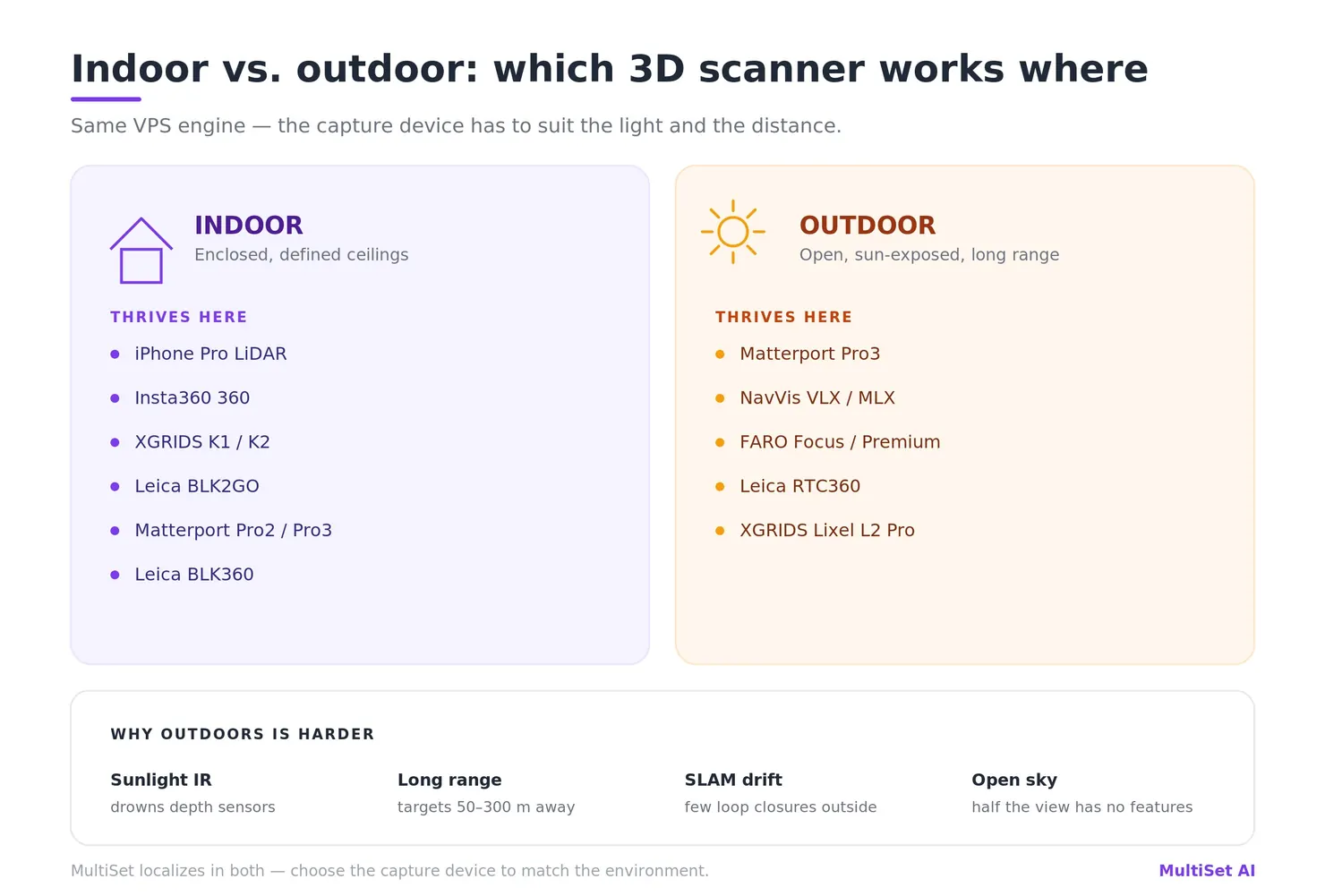
A useful rule of thumb from our deployments: iPhone, 360 cameras, the compact XGRIDS K1/K2, and lightweight handheld SLAM are happiest indoors, in enclosed spaces with a ceiling overhead. When the job moves outdoors - yards, façades, mixed campuses - the work shifts to a stationary LiDAR camera like the Matterport Pro3 or a long-range mobile system like the NavVis VLX. That's not a knock on the lighter gear; it's matching the tool to the light and the distance.
One reassurance, because it matters: this axis is about capture, not about where MultiSet can localize. Our VPS runs indoors and outdoors - you pick indoor or outdoor at upload, and runtime sensor fusion plus GeoHint bridges the boundary as a device walks from a sunlit yard into a building. The device just has to capture each environment cleanly first.
When teams see a device table, they want a single accuracy figure next to each row. We deliberately don't publish one, and the reason is the whole point of this post: VPS accuracy is a property of the capture, not the scanner. The same RTC360 produces a flawless map in a feature-rich plant and a shaky one through a glass atrium. So a number stamped on the hardware would be honest about the device and dishonest about your result.
What we can commit to:
How that turns into a commitment depends on the engagement:
| Tier | How accuracy is set |
|---|---|
| Self-serve | We publish a performance range: the top bounded by an optimal-quality scan on a current-generation device, the floor by minimum-spec capture and hardware. It sets honest expectations across variability we can't pre-vet. |
| Enterprise | Capture conformance is a gate at onboarding, not a dispute after deployment. During a PoC/pilot we agree the scan modalities and target devices, then set accuracy and latency SLAs against those agreed inputs. |
So in the table below, read the accuracy column as each scanner's own manufacturer-rated geometric precision - the input, not our localization output. It tells you how clean the raw geometry is, not what your map will score.
A single room, a café, a retail floor, a compact booth, a lab - almost always indoors. Reach for the cheapest disciplined capture you have.
For most small indoor spaces, a $550 camera or the phone in your pocket is the correct answer, full stop. (For the deeper argument on why a cheap 360 capture can carry enterprise-grade localization, see Pretty Just Got Cheap. True Is Still Scarce.)
Larger retail, museum galleries, office floors, production areas, warehouses, even whole multi-floor buildings when they break into rooms and corridors. Here you choose deliberately between precision and throughput - and start watching for sun-exposed zones.
Airports, factory floors, distribution centers, large halls, and the outdoor sites that come with them. This is where hardware actually earns its price tag - and where you almost always split the space into sections and merge them.
NavVis deserves a specific mention here: it's the platform most of our largest enterprise customers standardize on - the ones whose footprints run past 10 million square feet of mapped space, much of it mixed indoor-outdoor. Its long-range dual-LiDAR design, drift-minimized SLAM, and GNSS registration are exactly what hold a trajectory together across sunlit yards and long open runs, where a lighter handheld would wander. The wearable VLX 3 and VLX 2 cover the big footprints; the lighter handheld MLX fills confined zones; all three feed MultiSet through E57. When the job is "map a campus and keep mapping," NavVis is usually the workhorse.
Either way, you capture in sections and let MapSet stitch them into one continuous coordinate frame. You do not scan a 500,000 sq ft site in a single heroic pass.
Indicative figures to size a decision. The accuracy column is each device's manufacturer-rated geometric precision (the input) - not MultiSet's localization output, which is governed by capture quality as described above. Confirm current specs and pricing with the vendor, as they move. Each device links to its MultiSet ingestion docs.
| Device | Class | Native accuracy (mfr. spec) | Best environment | Native output | Indicative price | Best-fit space |
|---|---|---|---|---|---|---|
| iPhone Pro (LiDAR) + MultiSet app | Phone LiDAR | Consumer depth (no published mm spec) | Indoor only | MultiSet map | Phone (~$1,100+) | Small rooms; thin-corridor multi-floor via MapSet |
| Insta360 X5 / X4 | 360 camera | Vision-derived (no native depth spec) | Indoor (outdoor at 8K, with care) | Raw 360 video | ~$550 | Small–medium; fast capture and low-cost updates |
| XGRIDS Lixel K1 / K2 | Compact handheld SLAM + 3DGS | ~±1.2 cm (mfr.) | Indoor / enclosed | LAS/LAZ/E57/PLY + Gaussian splat | K1 ~$12.5K | Small–medium enclosed; splat + point cloud in one pass |
| Matterport Pro3 | Stationary LiDAR camera | ±20 mm @ 10 m | Indoor + full-sun outdoor | E57, MatterPak | ~$5,400+ | Medium interiors and outdoor approaches; twin + VPS |
| Leica BLK360 (G2) | Stationary terrestrial | 4–6 mm @ 10 m | Indoor; sheltered outdoor | E57 | ~$23–38K | Medium, higher-precision interiors |
| FARO Focus (Premium) | Stationary terrestrial | up to ~2 mm @ 10 m | Indoor + outdoor (survey) | E57 | ~$45–63K (Core from ~$6K) | Medium–large, survey-grade |
| Leica RTC360 | Survey-grade terrestrial | ~1.9 mm | Indoor + outdoor (survey) | E57 | ~$60K | Large continuous; precise baseline |
| Leica BLK2GO | Handheld mobile SLAM | 6–15 mm rel. | Indoor; short outdoor runs | point cloud / E57 | ~$27–50K | Segmented interiors; fast throughput |
| NavVis VLX 3 / VLX 2 | Wearable mobile SLAM | ~5 mm point cloud | Indoor + outdoor (strong outdoor) | E57 + panoramas | Enterprise (quote) | Large multi-floor and mixed campuses; the workhorse |
| NavVis MLX | Handheld mobile SLAM | ~5 mm point cloud | Indoor + outdoor | E57 + panoramas | Enterprise (quote) | Confined/complex zones; complements VLX |
| XGRIDS Lixel L2 Pro | Handheld SLAM + 3DGS | sub-2 cm rel. / ~3 cm RMS abs. | Indoor + outdoor (long range) | LAS/LAZ/E57/PLY + Gaussian splat | Quote | Large/segmented; point cloud and splat in one pass |
Two callouts. XGRIDS is currently our first supported Gaussian-splat pipeline, exporting a metric-scaled splat via Lixel CyberColor (PortalCam, L2 Pro, K1, K2) - a photoreal splat and a survey-usable point cloud from a single walk. Within that family, the compact K1/K2 are indoor/enclosed tools, while the longer-range L2 Pro stretches to outdoor and large sites. And the Matterport Pro3 is the clearest example of the indoor/outdoor axis in one product line: same vendor as the Pro2, but the move from structured light to LiDAR is what put outdoors on the menu.
Not sure which scanner fits your site? Tell us the square footage, whether it's indoor or outdoor, and what changes over time - we'll help you spec the capture device and modality before you buy. Book a capture consult →
If you take one thing from this guide, take this: for sub-5 cm, how you capture matters more than what you capture with. A disciplined walk with a mid-tier device beats a careless pass with a survey rig, every time.
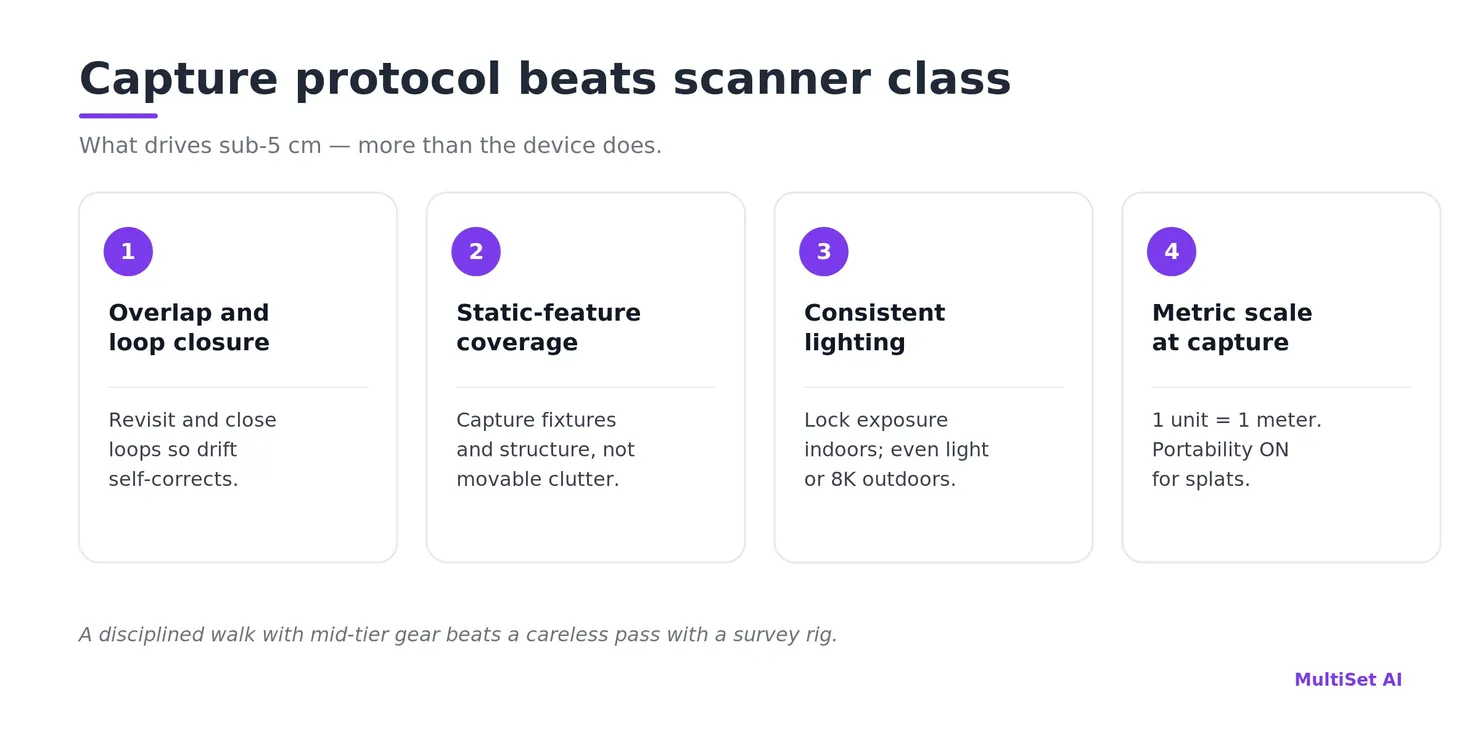
The protocol that drives accuracy:
Be honest about where any VPS struggles, too: blank corridors, repetitive racking, and glass curtain walls are hard for everyone, and open sky and moving traffic add their own noise outdoors. 360 capture helps indoors because features persist across the full view sphere, but no device can invent texture that isn't there. Some spaces need deliberate treatment - added visual markers, tighter loops, per-zone acceptance testing - before they index well. (For when fixed markers actually beat markerless capture, see Marker-Based vs Markerless AR Localization.)
The biggest cost mistake isn't buying too much scanner. It's buying for the first capture and forgetting the next fifty.
A site-wide baseline may genuinely warrant a survey-grade scanner. The versions almost never do. With map versioning and partial-map updates, you re-register only the section that changed, under the existing coordinate frame - anchors, navigation paths, and AR content carry forward untouched. That means a plant-wide map captured once with an RTC360 can be kept current, section by section, with a $550 Insta360 - for years, at almost no marginal cost.
So the right hardware plan is usually two devices, not one: a precise tool for the baseline, and a cheap, fast one for the lifecycle. Match the re-capture cadence to how fast each zone actually changes. Loading docks shift weekly; lobbies shift yearly. Spend accordingly.
Everything above is about building the map. The device that uses it has a much lighter spec: any standard RGB device with SLAM tracking - a phone, a robot, a headset, a wearable. No depth sensor required at query time, indoors or out.
For the tightest results, use the multi-frame query API instead of single-frame. It fuses a short burst of frames with the device's own SLAM into one pose - pushing past 5 cm and suppressing the confident-but-wrong matches that repetitive and sun-washed scenes produce. On-device, localization runs offline at roughly 38 ms on Apple Silicon and 52 ms on a Snapdragon 8 Gen 3, so the runtime device is rarely the constraint. This same map then drives every downstream job: AR work instructions and asset navigation, ground truth for AMRs, drones, and cobots, QA and commissioning on site, and retail planogram compliance.
Everything above is true regardless of vendor. Here's what we bring to it.
One pipeline ingests all of it - iPhone, 360, E57, LiDAR, Gaussian splat - and produces a tile-based VPS map with pose resolved in 1.5 to 2.5 s in the cloud or about 52 ms on-device. It localizes indoors and outdoors from the same stack, using sensor fusion and GeoHint to bridge the GPS-to-GPS-denied boundary as a device moves between a yard and a building. MapSet stitches sections, floors, and buildings - even across capture types and environments - into one coordinate frame, and georeferencing ties that frame to the real world. Map versioning keeps it current without re-authoring content. And it runs wherever your data has to live: public cloud, private VPC, self-hosted on-prem, or fully on-device - from a single room to multi-million-square-foot enterprise campuses. (See it in production in our case studies.)
The point of being scan-agnostic was never to make hardware irrelevant. It was to make hardware yours to choose - by the space, the light, and the budget in front of you, not by what your VPS vendor happened to support.
There's no single best scanner - MultiSet is scan-agnostic, and the right device depends on space size, indoor vs. outdoor conditions, and precision needs. For small indoor spaces, an iPhone Pro (LiDAR) or an Insta360 360 camera. For medium spaces, a Matterport Pro2/Pro3, Leica BLK360, or FARO Focus - or an XGRIDS or NavVis mobile scanner for speed. For large or outdoor sites, a survey-grade Leica RTC360 or FARO Focus Premium, or a NavVis VLX/MLX. MultiSet ingests E57, point clouds, raw LiDAR, 360 video, and metric-scaled Gaussian splats.
Usually not. Survey-grade hardware is justified by large continuous open volumes and by baselines that need certifiable precision. Most spaces break into rooms and floors and index beautifully from a phone, a 360 camera, or a mobile SLAM unit. Accuracy comes from capture discipline and feature coverage, not from price.
Three things: sunlight drowns infrared depth sensors (so iPhone LiDAR and structured-light cameras struggle), distances are far longer (so you need long-range LiDAR), and open space starves SLAM of the loop closures it relies on. Indoors, lightweight gear - iPhone, 360, compact XGRIDS K1/K2 - shines. Outdoors, reach for a Matterport Pro3, a NavVis VLX/MLX, or a survey-grade FARO/Leica. MultiSet localizes in both; it's the capture device that has to suit the environment.
Our goal is sub-5 cm median, 6-DoF, across every input, and higher-grade survey scanners can reach sub-1 cm with the right capture. We don't quote a fixed number per device, because the result is set by capture quality and coverage rather than the sensor. Self-serve users get a published performance range; enterprise engagements set accuracy and latency SLAs against agreed capture modalities after a pilot.
Yes - that's the normal case. MapSet stitches maps from different devices, formats (360, E57, LiDAR, splat), and environments into one coordinate frame. Capture each zone with whatever fits it best.
No. If it exports E57, a point cloud, or a metric-scaled Gaussian splat, it comes straight in. Matterport, Leica, NavVis, FARO, and XGRIDS are all supported paths - see third-party scans.
If the building is indoor corridors, rooms, and floors - yes. We've seen a 25,000 m² multi-floor university captured on iPhone LiDAR and merged into one map. If it's one giant open volume, or it's outdoors, reach for survey-grade or long-range SLAM instead.
Partial-map versioning with a prosumer 360 camera. Re-scan only the section that changed; the rest of the map and all its content stay put.
Insta360 X4 and X5 for 360 video; XGRIDS (via Lixel CyberColor) for Gaussian splats, with more pipelines being validated. The list grows - if there's a device you need, tell us.
Pick the space, the light, and the lifespan first. The scanner is the easy part after that.
Start free on the developer portal, book a demo, or send us your site and we'll spec the capture plan with you.
Further reading: 360 Video to VPS · 3DGS to VPS · E57 to VPS · Map Versioning · Bridging Indoor-Outdoor AR · Enhancing VPS Accuracy in Dynamic Outdoor Environments · Pretty Just Got Cheap. True Is Still Scarce. · Mapping Equipment Docs · Third-Party Scans
About the author: Shadnam Khan is COO of MultiSet AI, where he works hands-on across data-model training, testing, and the deployment of enterprise visual positioning across manufacturing, logistics, construction, and retail sites worldwide. Connect on LinkedIn or join the MultiSet Discord.