First‑Lock That Sticks: A Developer Playbook for Instant, Reliable AR Cloud Localization
This post distills practical guidance from shipping across complex environments and lays out a clear playbook for AR cloud localization.
Shadnam Khan
MultiSet AI
Why First‑Lock Is Your First UX
If your experience takes more than a breath to anchor itself to the world, users feel it. They wiggle the device, glance at a clock, and their trust starts to slip. In enterprise scenarios - field service, training, guided picking, digital twins - trust is currency. Projects stall not because the 3D model isn’t pretty, but because the device can’t localize fast and reliably enough. This post distills practical guidance from shipping across complex environments and lays out a clear playbook for AR cloud localization that gets you a lock quickly, keeps you locked under real‑world noise, and scales from a single room to multi‑floor campuses.
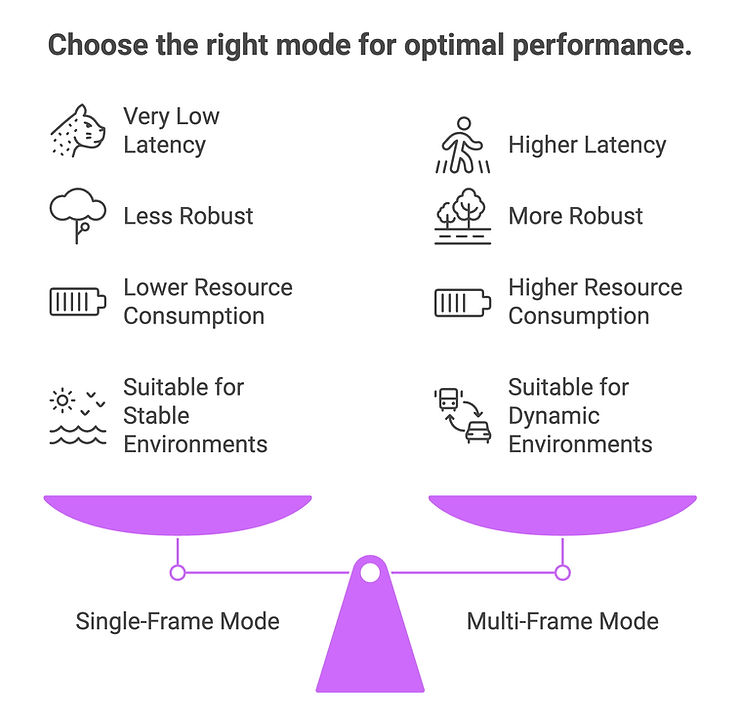
MultiSet’s philosophy is simple: there isn’t one magic setting. The environment changes, the user’s starting viewpoint changes, and network conditions change. So the system must be adaptive. MultiSet provides that adaptability by making Multi‑Frame localization the default for robust first‑locks, while giving you the option to rely on Single‑Frame one‑shot queries for ultra‑fast re‑locks in compact, well‑scanned spaces. Add GeoHint and HintPosition to shrink the search space and you’ve got a reliable first‑lock that feels instantaneous to the user.
TL;DR: Start robust with Multi‑Frame by default, use Single‑Frame for micro re‑locks, and accelerate both with GeoHint and HintPosition. Build your content on Individual Maps for rooms and MapSets for buildings/campuses. All of this runs on cloud for fast, scalable localization.
If you prefer to read the docs while you go, keep these open:
1) The Stakes: If First‑Lock Fails, the Experience Fails
Every AR workflow depends on a stable origin. Miss the first‑lock and everything downstream—UI prompts, guidance, occlusion, collision—becomes guesswork. The failure modes show up as support tickets and “it doesn’t work here” rumors:
Inconsistent start times: sometimes it anchors in a second, sometimes it doesn’t, so operators stop trusting it.
Bad starting views: users point at blank walls, skylights, or crowded scenes with motion blur.
Scale amplification: a strategy that worked in a small lab collapses when you roll out to a multi‑floor hospital.
Content drift: even after the first‑lock, a brittle solution drifts under changing lighting, repetitive textures, or people flow.
The fix is not a single algorithm - it’s a system behavior: how your app escalates evidence, narrows search, and guides the user. That’s what the rest of this post is about.
2) First‑Lock Playbook: Multi‑Frame by Default, Single‑Frame When Speed Is Paramount
Multi‑Frame (default) accumulates evidence across a short rolling window of frames. It tolerates imperfect first views—weak texture, motion blur, partial overlap—and trades a bit of latency for a much higher probability of a correct lock.
Single‑Frame is a one‑shot query. When the first view overlaps strongly with the map and the space is compact and unambiguous, Single‑Frame can return in milliseconds, making it ideal for frequent relocalizations during a task.
Neither is universally better. MultiSet’s job is to give you the flexibility to pick the right mode for the moment - and to blend them automatically based on telemetry.
Scenario‑by‑Scenario Guidance For AR Cloud Localization
Scenario
Recommended mode
Why & Typical latency envelope*
Cold start in a new session; user may point anywhere
Multi‑Frame (default)
Tolerates poor initial overlap, blur, repetitive structure
Higher than Single‑Frame; varies with network + frame budget
Frequent relocalizations (occlusion, brief loss)
Single‑Frame, fallback to Multi‑Frame
Ultra‑fast re‑lock; escalate if miss
Very low (often ms → low hundreds ms)
Small/compact areas (demo booth, kiosk) with good texture
Single‑Frame
Stable viewpoints and high overlap make one‑shot ideal
Very low
Large indoor/outdoor or multi‑floor sites
Multi‑Frame + GeoHint/HintPosition
Aggregation improves confidence across varied visuals
Higher
Low light / motion blur / dynamic crowds
Multi‑Frame
Temporal evidence smooths noise and occlusions
Higher
Battery/thermals constrained; environment is distinct
Single‑Frame
Less compute/uplink per attempt
Very low
*Latency varies by device, uplink, map size, and frame budget. Instrument and tune for your SLOs.
Practical Control Loop (No Code, Just Behavior)
On app launch: begin with Multi‑Frame so the first lock is robust even if the user starts from a non‑ideal view.
After lock: keep visual‑inertial tracking on the device. If quality degrades (occlusion, fast motion), first attempt a Single‑Frame re‑lock because it’s cheapest and fastest.
If Single‑Frame misses within your budget, escalate to Multi‑Frame and prompt a gentle 15–30° sweep with a subtle UI nudge. Don’t nag; let vibration or a ghosted arc do the coaching.
3) Shrink the Search Space with HintPosition and GeoHint
Robust localization is not only about how you search, but where and from where you start searching.
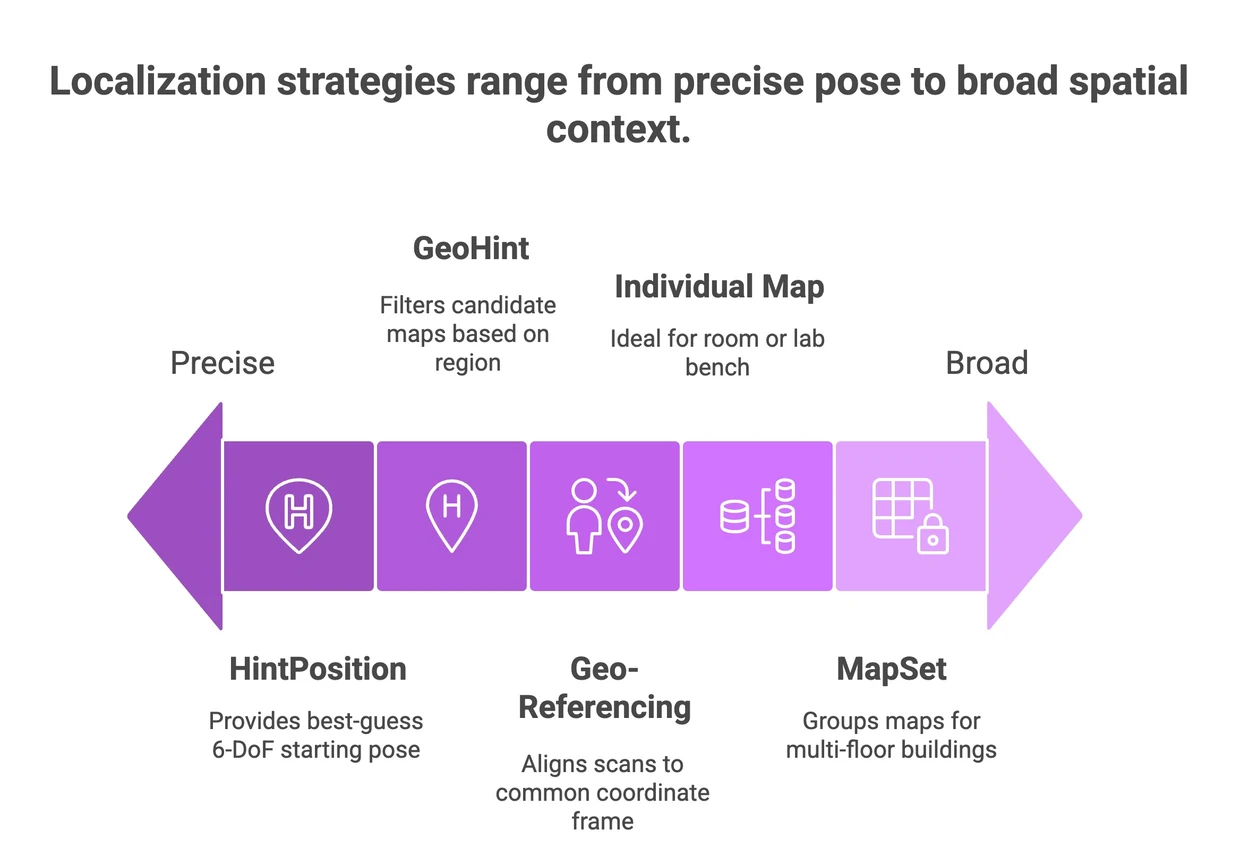
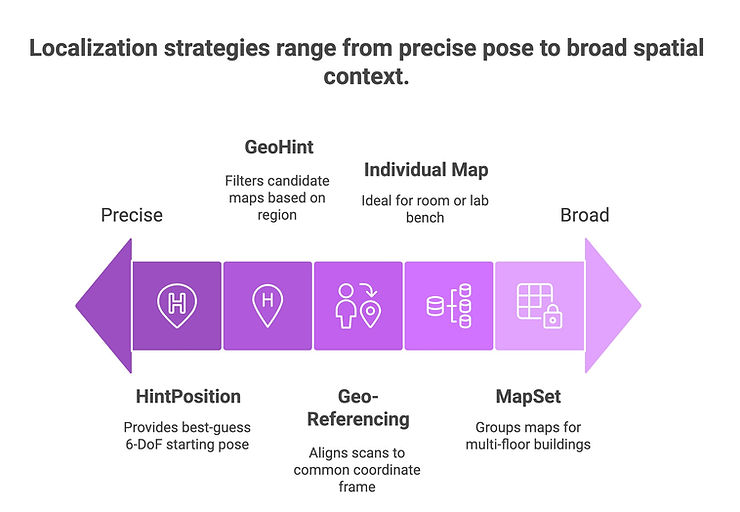
HintPosition (pose prior) provides a best‑guess 6‑DoF starting pose—often from the last session or from dead‑reckoning. With a reasonable prior, the solver can look in a much smaller neighborhood, cutting seconds off time‑to‑lock. Learn how here: https://docs.multiset.ai/unity-sdk/on-cloud-localization/pose-prior-hintposition
Recommended flow: Start Multi‑Frame. If there’s no lock within your budget, inject HintPosition (if available) and ensure GeoHint is set. Continue aggregating frames; if needed, prompt that small sweep. The combination of a spatial prior (GeoHint) and a pose prior (HintPosition) is multiplicative: less search, faster locks, fewer false positives.
Edge cases to note:
Symmetry traps (mirrored corridors, repeating shelving): seed HintPosition near the center aisle and avoid seeding in corners where the same pattern repeats.
Stale priors: don’t over‑trust an hour‑old or building‑to‑building pose prior. Decay it quickly and let Multi‑Frame take over.
Environment churn: if a space changes layout daily, expect higher reliance on Multi‑Frame and more frequent map refreshes in hot zones.
4) Big Spaces Done Right: Geo‑Referencing + Individual Maps vs MapSets
Scaling beyond a single room requires two design choices: aligning your scans to a global frame, and structuring your map content for handoffs.
Geo‑Referencing 101
When scans are aligned to a common coordinate frame, device sensors (IMU, compass, GPS where available) and GeoHint compose correctly, and the whole system “thinks” in the same spatial language. Misalignment is a silent tax on time‑to‑lock. Start here: https://docs.multiset.ai/basics/georeferencing-maps/how-to-align-scans
Version your maps and note the capture window (season/time of day) so you can troubleshoot lighting‑dependent mismatches.
Refresh incrementally: hot aisles, renovated lobbies, or frequently reconfigured shelves deserve a quicker refresh cadence than quiet corners.
Monitor localization quality by area. If a specific bay degrades, check for environmental change and bump the refresh schedule for that sub‑map.
5) Patterns That Scale
You can run everything here with on‑cloud localization for first‑locks and re‑locks, while the device maintains visual‑inertial tracking between locks. This balances performance and battery with the convenience of cloud maps and updates.
Recommended patterns:
Campus start: Initialize Multi‑Frame with GeoHint set to the current site. If you have a last‑known pose from the same site, pass it as HintPosition. Expect a robust lock even if the user begins under harsh lighting or with motion.
Task loop: During work (e.g., guided picking or inspection), let the device track locally. When you detect drift or confidence drop, attempt a Single‑Frame re‑lock first. If that fails within your chosen budget, escalate to Multi‑Frame silently and encourage a small sweep.
MapSet handoff: As the user transitions across zones (e.g., floor to floor), your app keeps GeoHint scoped to the building/campus, and the system resolves against whatever sub‑map is most relevant. The handoff should be invisible; your UI only celebrates when an anchor is solid again.
Network pragmatics:
Stride or batch frames to avoid spiking uplink; more isn’t always better—choose a rolling window that fits your latency budget.
Manage resolution: send frames at the sweet spot where match quality no longer improves materially with more pixels.
Bound the Multi‑Frame window so your users never feel stuck. If the window closes without a lock, show a short “aim here” overlay rather than a generic spinner.
Observability (treat these like SLOs):
Time‑to‑first‑lock (P50/P95) per site and device
Relocalization success rate (Single‑Frame first, then Multi‑Frame) and time budget adherence
Post‑lock drift and number of re‑locks per hour
Map health signals by area (e.g., sudden drops in quality indicating environmental change)
These signals tell you when to adjust thresholds, when to shift the Single‑Frame/Multi‑Frame balance, and where to refresh content.
Benchmarks are snapshots, not guarantees. Your device model, optics, network, lighting, and crowd dynamics all influence outcomes. The right expectation setting helps your stakeholders evaluate progress without chasing vanity numbers.
How to present results credibly:
Environment‑bound claims: Always label environment conditions (indoor/outdoor, lighting, motion blur patterns) and the map size.
Convergence curves: Instead of single latency values, show how success probability rises with frame count in Multi‑Frame and how Single‑Frame behaves under various overlaps.
Drift windows: Report drift after 30/60/120 seconds of on‑device tracking, with and without micro re‑locks.
Handoff smoothness: In MapSets, include a clip or sequence showing seamless transitions across zones. Stakeholders love seeing the lock persist while the user walks between floors.
Remember the end goal: a perceptually instant, reliable first‑lock. Whether that’s 300 ms or 1.8 s depends on your context; what matters is that it’s consistent and that the app communicates clearly during the brief ramp.
7) Troubleshooting First‑Lock in the Wild
Even a strong system hits rough edges. Here’s a quick triage that has saved teams hours onsite:
Symptoms → Likely causes → Practical fixes
No lock after several seconds → Initial view lacks texture; GeoHint not set; map mismatch → Add GeoHint, prompt a small sweep, ensure the correct map/MapSet is selected.
Intermittent locks (works sometimes) → Lighting cycles, reflective surfaces, or rolling shutter exposure → Lock exposure, avoid pointing at light sources, or expand the Multi‑Frame window slightly.
False positives (anchoring to the wrong place) → Symmetry/repetition; stale HintPosition → Decay or clear the prior, rely on Multi‑Frame + sweep; consider splitting the area into smaller sub‑maps.
Slow in a specific aisle or lobby → Environmental change post‑capture; occlusions from seasonal displays → Refresh that sub‑map; during the event season, bias Multi‑Frame thresholds higher.
Great in the lab, poor in production → Over‑tuned to a controlled environment → Re‑capture in representative conditions; broaden test devices; instrument thoroughly before rollout.
A few pro‑moves:
The most under‑used lever is camera behavior: keep exposure reasonable, avoid aggressive denoise or sharpening that destroys features, and coach users to pause briefly before moving.
Decide on failure: don’t let your app hang. If a window closes without a lock, show a clear prompt or let the user retry with a different mode.
8) Three Micro‑Scenarios to Make This Concrete
1) Service tech in a brightly lit lobby
The user opens the app under skylights and LED signage. Start with Multi‑Frame plus a GeoHint for the building. The first view includes reflections and motion—Multi‑Frame smooths that noise and locks confidently within your budget. Once attached, the app runs locally. If the tech looks away to consult paperwork and returns, a Single‑Frame re‑lock snaps the content back instantly.
2) Pick/Pack in a warehouse with repetitive shelving
Repetition and symmetry can confuse a one‑shot. Start Multi‑Frame with a HintPosition from the last pick and a GeoHint for the site so the system narrows the search. If a lock stalls, the app nudges a 20° sweep. Between bins, Single‑Frame re‑locks keep the flow snappy, while MapSet handoffs ensure the experience continues cleanly across zones.
3) Training demo at a conference booth
Space is compact, lighting is manageable, and the backdrop is consistent. This is Single‑Frame heaven. Use Individual Map content. The experience feels instant, and because the camera often starts on the same view, re‑locks occur in a blink. If the booth gets crowded and motion blur increases, let Multi‑Frame catch misses quietly.
9) FAQ for Developers
Q: When should I use Single‑Frame vs Multi‑Frame?
Start Multi‑Frame for robust first locks in imperfect views. Use Single‑Frame for ultra‑fast re‑locks and in compact areas with strong overlap. Blend them based on your latency budget and telemetry.
Q: What’s the difference between GeoHint and HintPosition?
Q: When do I move from Individual Maps to MapSets?
Q: Can I localize on cloud and then work offline?
Q: How do I communicate state to the user without breaking immersion?